[Foxtrot Engine] DLL Madness!!
Overview
About two weeks ago, I began dividing the entire code base of the Foxtrot Engine into several .dll projects. The purpose was to accelerate development by reducing the time required to build the game. I thought implementing a modular system—one that could be attached and detached dynamically—would suffice. However, I couldn’t have imagined the amount of toil I would experience…
Development Logs
2026.01.13. Tuesday
Pure madness of NAMESPACES!
The first thing I did was, obviously, to divide the entire code base. Putting the classes into separate namespaces seemed like a good start. Unfortunately, I had to go through countless files in the Visual Studio project, place each class into its respective namespace, and add prefixes to the variable identifiers. This was nightmarishly tedious and consumed a huge amount of mental energy, since I had to keep adding prefixes, recompiling the code over and over, and still couldn’t stop the endless stream of syntax errors!
The use of AI agent - Claude Code
I definitely don’t support ‘vibe coding.’ But I thought the AI agent would help me with this kind of repetitive task. Despite my expectations, however, there were several ‘What the heck?!’ moments that left me frustrated.
What the heck?! - It skips the file!
I set the working directory to one of the .dll projects and ran the Agent AI. Somehow, however, it skipped several files, even though those files contained errors I wanted the AI agent to resolve. I modified the prompt to iterate through all the files, recursively referring to those in the directory, but I still couldn’t expect a perfect result.
What the heck?! - The code is gone!
Soon, I tried giving the AI agent a more general (or ambiguous…?) prompt. Instead of writing ‘Resolve errors related to the namespaces,’ I wrote ‘Resolve any errors.’ The result? Catastrophic. Even though I explicitly mentioned not to change the logic of the code, Claude Code deleted some parts of it. I was terrified because I thought I might not be able to recover the files. Thankfully, I managed to check out the repository to another branch and retrieve the missing files. At this point, I was angry, but before throwing the tool out the window, I decided to adjust the prompt and try again.
Detailed prompt - It worked, but not perfect
The last prompt I used included a list of about five detailed instructions. It was quite amazing to see the agent translate the message and perform well, but not all errors related to namespaces were resolved. So instead of clinging to the AI agent, I decided to get my hands dirty.
DLL decoupling?!!
I spent a significant amount of time creating the .dll project files according to their respective features, but I encountered a bunch of linking errors—the notorious ‘unresolved external symbol.’ The cause of the problem? The code was coupled across different projects. This meant that a module that should have been independent from another was instead dependent on the code it was supposed to be attached to.
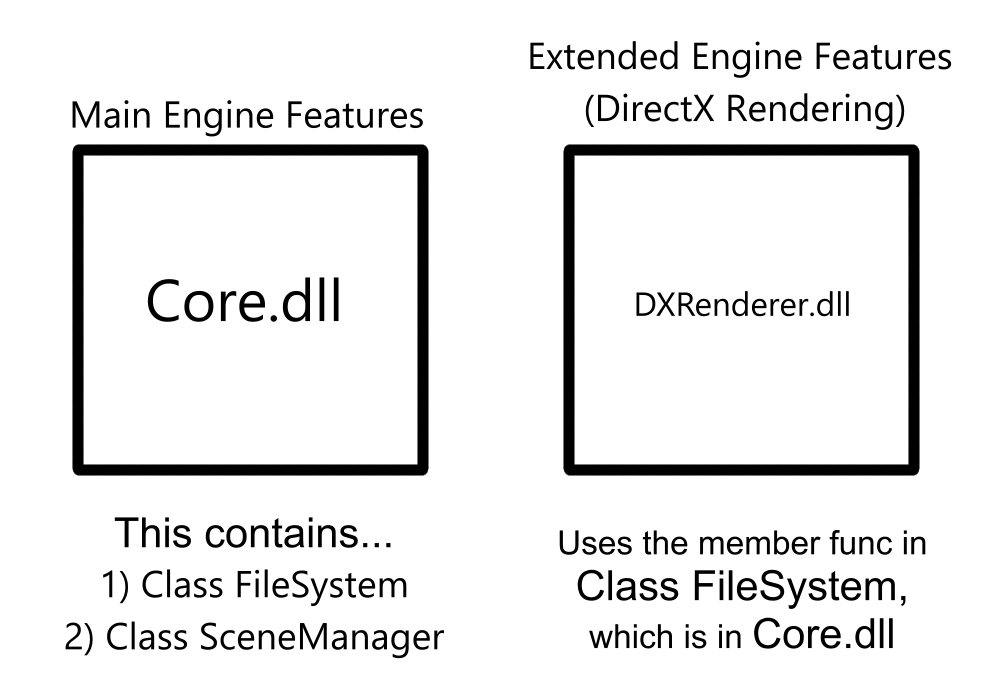
So, from now on, I have to decouple the code!
Checkout my works!